Installation and Getting Started
Supported Python Versions: 3.8+
Supported Platforms: Linux, Windows, MacOS
This page explains how to install django-overcomingbias-api and run some basic commands.
Installation
Install django-overcomingbias-api and its dependencies from
PyPI
$ pip install django-overcomingbias-api
Add the project requirements django-ordered-models and obapi to your installed
apps:
# settings.py

INSTALLED_APPS = [
    ...
    # Optional (admin integration)
    "django.contrib.admin",
    "django.contrib.auth",
    "django.contrib.contenttypes",
    "django.contrib.sessions",
    "django.contrib.messages",
    # Required
    "ordered_model",
    "obapi",
    ...
]

# Optional setting - controls number of overcomingbias posts to hold in memory while
# downloading
# OBAPI_DOWNLOAD_BATCH_SIZE = 1000
If you would like to use the REST API, add the obapi URLs to your urlpatterns:
# urls.py
from django.urls import include, path

urlpatterns = [
  path("", include("obapi.urls")),
]
Last, run the migrations
$ python manage.py migrate
All done!
Basic usage
The easiest way to use the app is through the Django admin site.
Setup
To initialise a database of all overcomingbias posts, use the “pull” button:
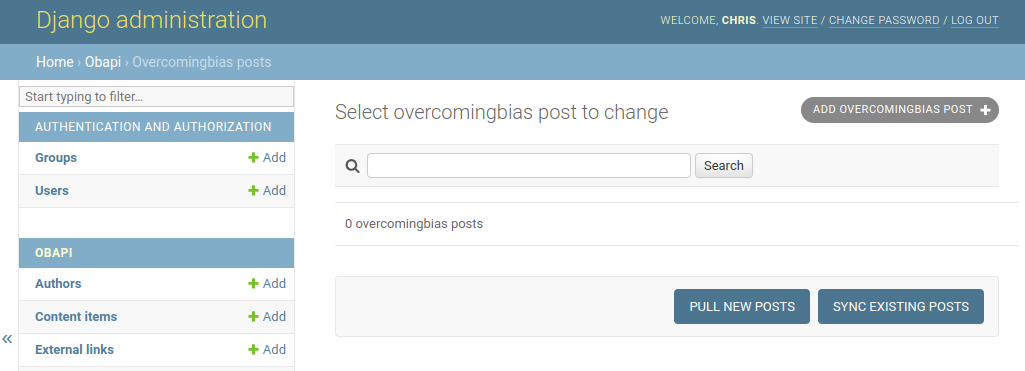
The “pull” button adds all new posts to the database, and the “sync” button updates any posts which were modified since the last update.
To add YouTube and Spotify content, use the identifiers found in their URLs. For example:
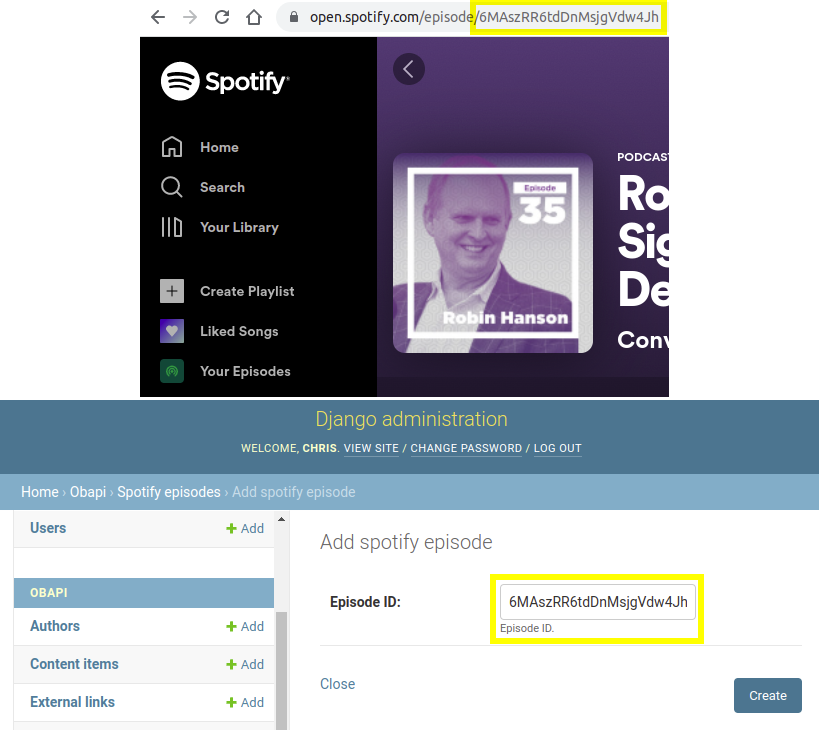
You can also overcomingbias posts individually, but this is not recommended, as it will interfere with “pull” and “sync” functionality.
Managing Data
ContentItem is the base class for all content.
Overcomingbias posts are represented by the subclass OBContentItem.
Similarly, YouTube and Spotify content is represented by the YoutubeContentItem and
SpotifyContentItem subclasses.
To provide rich but flexible classification (groupings) of content, three types of
“classifiers” are used: Tags, Ideas and Topics.
Idea classifiers represent specific ideas (e.g. “prediction-markets”), Topic
classifiers represent general topics (e.g. “institutions”), and Tag objects represent
anything else (i.e. arbitrary metadata about the content).
When adding content:
Initially, posts and other content are categorised using only
Tags.To merge a set of
Tags /Ideas /Topics, use theMerge Objectsadmin action.To convert a classifier to another type (e.g. convert a
Tagto aTopic), use theConvert selected items to ...admin action.
Posts often contain hyperlinks to other posts (or other content):
These links are initially represented as
ExternalLinkobjects (basically just a URL).To convert these links into ManyToMany relations on the content objects, use the
Internalize Linksadmin action.To remove any
ExternalLinks which are no longer referenced, use theDelete Unreferenced Linksadmin action.
Using Data
To use the data, you can
Provide your own Django views on top of the database
Use the REST API and build a frontend in whatever framework you like
Automatically generated API documentation can be found at the URL /api/docs by
default.
Getting Help
If you want to try out the package and / or are curious to learn more, feel free to reach out.